Showing posts with label holds. Show all posts

Friday, September 25, 2020

How to change pick up location of a hold already on your shelf

 So the patron got a notice their hold was at your library.  They call and want you to send it to another library instead.  What do you do?

1.  Check out the item to yourself.  Screen will tell you the item is on hold for someone else, do you want to continue?  Say yes to override the original hold, and CKO.  Say yes to renew the borrower's request (this will put them back in the same place in the queue).

2.  Go to your patron's record.  

3.  From the CKO screen file menu select Borrower -> Request. 

     a. Highlight the item that needs the hold pickup location changed. Choose Edit. 

     b. Set pickup location to requested branch and save.

4.  Check in the item  (exempt) and it should trigger a hold for the original patron to go to the new location.


This can be done as a batch for a single customer,  but it will only work for items that have the same status (ex: all items in transit have to be batched together, items requested together, items hold together).  


9/2020


Friday, April 13, 2018

Video Game Hold Limits

Video game checkout and hold limits are separate from other items limits.  As of April 23, 2018 both the checkout and hold limits will be set at 5.  This means a customer may have a maximum of 5 games checked out and 5 games on hold.  If they are at their limit of games checked out, self-check will not let them check out any more; a game currently checked out would have to be returned before they could check out another.


4/2018

Wednesday, January 3, 2018

Number of Holds Allowed

The majority of FCPL borrowers are allowed up to 30 holds (with exceptions noted below). This 30-item hold limit should not interfere with our 25-item maximum check out policy since it would be rare indeed for all 30 holds to arrive at the same time. If this does prove an issue, you can show the patron how to suspend some of their holds. See posting(s) related to "Suspend A Hold Request".


  • 0 holds allowed: FLTTR, FMR, FPAY, FSURF, FCOLL

  • 30 holds allowed: All other Fresno borrower types - including staff

Note: Cancelled and Expired Holds do not visibly show on the customer's request list. However they are still technically part of their request list and therefore count towards the overall total. If you suspect a "hidden" request in a customer's request list is preventing them from placing additional request, contact the Jurisdiction System Administrator, who will check with System Office.

rev. 1/2018

Thursday, January 28, 2016

Dos and Don’ts of Changing the Hold Pickup Location

You can change the pickup location of a customer's hold, but only in certain circumstances...otherwise the hold will never be filled.

Scenario: your customer has moved and wants to pick up all their outstanding requests at the branch closest to their new home. It is okay to change the hold pickup location for a customer’s hold as follows:
  • The old and new pickup location must be within the same library jurisdiction. So you can change it from Clovis to Fig Garden. But never Beale Library (Kern County) to Fig Garden (Fresno County).*
  •  You can change the pickup location anytime before an item is attached to the request or if the status of the request / item = transit hold / transit request. If it's already on the hold shelf or expired, no dice. 
*Do NOT Change Pickup Locations from One Jurisdiction to Another Jurisdiction

Why? Because this method circumvents the holds rules in place for each jurisdiction so there's a good chance the hold will never be filled because the item will never appear on the pull list of an owning library. 

Yes, Horizon will let you change the pickup location from Beale Library (Kern County) to Fig Garden (Fresno County), but the request will never be filled. Even your customer is #1 in the queue, all the other requests will just jump over it as they are filled first. 

Some staff have tried to 'help' their customers who have been blocked from placing a hold on a title by making the request through say Kern County’s ValleyCat page (or in Horizon under a Kern County Location). After the request is made with a Kern County pickup location, they manually change it to one of Fresno's pick up locations. This 'work around' does not help the customer. In fact, it pretty much ensures they will never get the item - even if Fresno buys their own copies. 

The customer should wait and place a hold on that title when there are requestable copies available. Chances are that will occur shortly if it's a new popular title. If not, staff or the customer can make a Request for Purchase or an ILL as appropriate. 


rev. 5/2018

Sunday, April 28, 2013

Items Stuck on the Expired Holds List

Holds that don't disappear from your expired holds list are the result of items on the hold shelf which have expired and then were checked out before being checked in. To prevent this from happening in the future, if an item on the hold shelf has expired, CHECK IT IN BEFORE YOU CHECK IT OUT to anyone.

For those items that keep showing up on the  expired holds list, but are not on the shelf - check the item in DAMAGED, then put it in TRACE status. This will keep your expired holds list current.


Monday, November 29, 2010

Request List Numbering Oddity

Every once in a while you may come across a request list where the number to the left of the customer's name does not match their number in the queue. For example, in the screen shot below Customer #1 Hauser, Paul B is #46 in the queue. This is an occasional bug where the request order numbers do not get reset as they are filled. We don’t know why it happens. But it doesn’t affect the order in which the holds are filled.

Monday, November 15, 2010

Requests by Minors on R-Rated Movies

Most of the time, a minor is prevented from even requesting an R-rated movie since our policy restricts them from checking this type of movie out (http://www.fresnolibrary.org/card/vpolicy.html). However, sometimes you will see a minor's account on the request list for an R-rated movie. How is that possible? It's complicated, but everything hinges on the itypes of the items attached to the title and whether or not the request was made through Horizon,  ValleyCat or the Enterprise catalog. If you notice an R-rate movie with requests made by minors, here's what is happening:

> At least one of the copies will not have an R-rated itype.
> Usually these copies are from another SJVLS member. They will have an itype that restricts the item from checking out to another System member, but not address the R-rating. These itypes have the word "new" in the description.
> If the minor makes a request on an R-rated movie that has copies with this mix of itypes, ValleyCat will allow the request. It cannot analyze both of these circulation rules at the same time. So it ignores the R-rated rule and allows the request.
> However, if the request was made in Horizon or the Enterprise catalog, both rules will be enforced. And in fact, these requests by minors will never actually be filled. Horizon will ignore these requests, skip over them and fill the allowable requests.


rev. 8/2018

Wednesday, August 11, 2010

Find Out Location of "Hold Shelf" Item

Here's two ways to find out the location of an item with a status of "hold shelf". Neither is very convenient, but they work.

Method 1
  • F2 - Search for the item by title or barcode.
  • Click Show Copies
  • Click on the copy with the "hold shelf" status
  • Send it to Copy/Item List (F10)
  • Click Edit to open the item record, go down to where it says "Out to Borrower No."
  • Look up the borrower# in circ and find out where the item is being held from their Blocks screen.

Method 2 (more cumbersome if there's a lot of copies with Hold Shelf status)

  • F2 - Search for the item by title or barcode.
  • Go to Request - View Title Request List
  • Click on an item with "hold shelf" status
  • Click Borrower Requests
  • Look to see if that item matches the specific item barcode you're looking for.
  • If not, go to another "hold shelf" item in the list and check that one's Borrower Requests.

Tuesday, July 6, 2010

How Holds are Filled

Here's an overview of how items are selected to fill holds within Fresno County. Horizon has a series of "priorities" it uses to select an item to fill a hold with a Fresno County pickup location.

BTW...nothing in the borrower's registration record affects how a hold is filled - not location, btype or bstat. It's all based on 1. pickup location and 2. where hold was placed (whose catalog was used or what location Horizon was logged into to place the hold). Also see Dos and Don’ts of Changing the Hold Pickup Location. 

  • When a hold is placed with a Fresno pickup location, Horizon first checks to see if any Fresno items are available (checked in) to fill it.
  • If there is an available Fresno copy and there is more than one copy checked in, Horizon will select the copy that has been sitting on the shelf the longest.
  • If there are Fresno copies, all holds with a FCPL pick up location will be filled first before holds at other jurisdictions. That is how a Fresno customer can be #10 in the list and receive their copy before #1-#9 who have pick up locations outside of Fresno's jurisdiction.
  • Note: Horizon is not so finely tuned it can select the geographically closest item to the pickup location. So don't expect Horizon to look at only metro items to fill metro pickup locations first, then go further afield to the east and west side locations. That degree of fine tuning is not possible.
  • In some instances when everything else is equal, the time of day the pull list report is run can factor into which Fresno copy fills the hold.
  • Also, as soon as an item is returned and checked in, it may go to fill a hold regardless of who has it showing on their pull list at that moment. That is why you may check in an item from your pull list only to discover it is not needed any longer to fill a hold.
  • If there is no Fresno copy available, Horizon will look for an available copy at another jurisdiction to fill the Fresno hold.
  • There are some Fresno items that will only fill holds within Fresno County: video games (FVIN) and reference (FRE). These items are not available to fill holds outside Fresno County.
  • This link (https://www.sjvls.org/services/special_loan_rules) shows the loan policies by format for each SJVLS jurisdiction. This tells you what items are allowed to fill holds from one jurisdiction to another.
Similar priorities apply to every jurisdiction. Horizon will always look to see if there's a copy of the item in the same jurisdiction as the pick up location before looking further away.


rev. 2/2020

Tuesday, June 22, 2010

When Hold is Missing from the Hold Shelf

Sometimes, the customer's hold cannot be located anywhere in the branch - even though it shows it was checked into the hold shelf. If this is the case, follow these steps to reinstate the customer's hold in the queue so they receive the next available copy. 
  • Make sure the item has a status of "hold shelf" and is not misfiled and/or in the back room.

  • If you still cannot find it, then CKO the item to your branch’s library card account for problem items.*

  • Select Yes at “Do you want to check it out to: "your library's problem account"

  • Select Yes at “Renew this borrower’s request?”

  • The borrower will be reinserted back into the hold queue to receive the next available copy.**

  • Check in the item using Damaged Mode. This will prevent the missing item from filling any more holds.

  • Click Edit Item and change the status from "dmg" to "trace".
*Many branches have one or more library cards they use to handle problem items, phone holds, etc. If you do not have this type of card, create a new borrower as ‘BRANCH NAME’ PROBLEM BOOKS (i.e. FRESNO CIRCULATION PROBLEM BOOKS). Use day created for the birth date.

**If for some reason they fall to the bottom of the holds queue, contact the Jurisdiction System Administrator to request the customer's hold be reinsterted into the queue in the correct position. 


rev. 5/2015

Monday, August 31, 2009

"Small Fee for Holds" Message in ValleyCat

Whenever a customer places a request in ValleyCat, they receive the Request Confirmation page shown below. It will always contain the message "Please note, some libraries charge a small fee for holds" regardless of their btype or location. Thanks to Measure B, Fresno does not charge a fee to place a hold so it does not apply to our customers. However, some other SJVLS jurisdictions may charge their customers for this service. Hence the message. Since we all use a single Horizon/ValleyCat system, this message cannot be customized to fit each customer/location.


rev. 8/2018

Monday, June 15, 2009

Hold Notification Block Won't Go Away

There are times when Horizon does not automatically remove the Hold Notification Block even after the borrower checks out the item or the hold expires and the item is returned to the owning branch. You can try to delete the block manually. However, if that still does not clear the block, report the borrower’s name and barcode, and the item’s title and barcode to the Jurisdiction System Administrator so it can be removed by a system-level process.

rev. 2/2018

Tuesday, May 26, 2009

Request vs. Hold Check Out Override

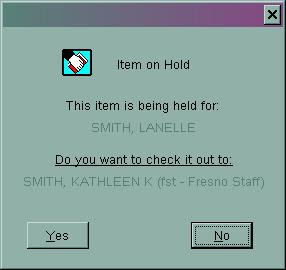
Every once in a while a patron brings an item to the circ desk and when you check it out to them, one of these two windows appears:
"Item Requested By" Override - YES
This means a borrower somewhere in the System has simply requested this item. Your borrower with the item in hand takes precedence over someone else in a remote location. Click “Yes” to check out the item to the borrower standing in front of you. The other borrower requesting the item will be assigned another copy. Note: The self check system follows this rule and will allow the patron to check out the item.

"This item is being held for" Override - NO (in most cases)
This means the item is already on the hold shelf for the first borrower listed on the message. The hold is linked to that borrower's library card, not the library card of the person standing in front of you. In most cases, click “No”. Of course, t
here could be exceptions to this rule. For example, the patron whose book is on the hold shelf may have authorized this other patron to pick up their items via a note in their library account. Note: The self check system follows this rule and prevents this patron from checking out the item and directs them to see staff for assistance.


rev. 2/2018

Friday, May 1, 2009

Placing an Item Specific Hold

When there are many different volumes under a single title/bib#, ValleyCat will not allow the user to place a hold on a specific copy/volume. Item specific holds are not allowed through ValleyCat. Why? Imagine what would happen if we allowed this in ValleyCat? It's possible that hundreds of patrons would place a hold on one specific copy of the latest best seller title even if we had purchased 20 copies. No other copies would fill their hold except that particular barcode. You get the idea.

Item specific holds can only be placed by staff in Horizon as follows:
  1. Search for the title.
  2. Click Show Copies.
  3. Highlight the specific copy/volume.
  4. From the menu bar select Request - Make Request (or simply press F5).
  5. Bring up borrowers account.
  6. Click the box next to "This Copy Only".
  7. Select the pickup location and click Request.

rev. 1/2018

When CKI Does Not Trigger the Next Hold

There's a possibility that checking in an item with numerous holds might not trigger the next hold. Here's when that could happen and what to do about it.
  • Amy puts a hold on the latest best selling Harry Potter book, along with 450 other people.
  • She finally arrives at the top of the queue and Location A sends the title to Location B for pickup.
  • However, between the time it leaves Location A and arrives at Location B (status=transit request), Amy goes to Barnes & Noble and buys her own copy of Twilight, then thoughtfully cancels her request.
  • Location B checks in the item. Since Amy's request no longer exists, Horizon sends that item back to the owning location (status=transit) - regardless of how many requests are still on that title. This is a wasted trip in the shipment and a delay for the next patron in the queue.
Here's 2 possible workarounds:  if you notice this has happened:
  • Check out the item to your branch's account. A screen appears asking if you want to check it out to your account even though it's requested by someone else. Click Yes. Then, check it in again. This should trigger the next hold.
  • Or you could change locations to the owning location. Check in the item. That should resolve the 'in transit' status completely. Check the item in again and that should trigger the next hold. 
rev. 1/2018

Tuesday, April 28, 2009

Select Pickup Location Outside FCPL

Some patrons want to place a hold at an FCPL location, but pick it up at a location outside of Fresno County. All ValleyCat access via the Fresno homepage and Fresno Horizon logins will only display FCPL locations. Therefore, you'll need to do one of the following in order to select a non-FCPL location:

  • In ValleyCat: Go to http://www.sjvls.org and from the drop-down on the right side select the ValleyCat catalog for the jurisdiction where the patron wants to pick up the hold. Find the item, place the request and select the pickup location for that jurisdiction. Both patrons and staff can use this method.
  • In Horizon: Go to File - Change Location. Select the location where the patron wants to pick up the hold. Search for the item, place the request and select from the list of pickup locations available for that jurisdiction. When you are finished, don’t forget to change location back to your own branch. This method is only available to staff.
Note: Just in case you're wondering, you cannot simply change the pickup location of an existing request to a non FCPL location via the borrower's record. Why? Because this method circumvents the holds rules in place for each jurisdiction and more importantly, the item will never appear on the pull list of the owning library. So it will look like you’ve placed the hold, but the item will never show up. So use one of the methods listed above instead.

rev. 8/2017

Wednesday, April 15, 2009

Suspend a Hold Request

There are times when it would be advantageous for a borrower to suspend one or more of their hold requests (i.e. going on vacation; stagger when holds arrive, etc.) Suspending a hold request allows borrowers to maintain their position in the request queue while they are away or wading through their other holds. So if they were #3 in the queue before vacation, they will still be #3 when they return even while other patron's holds were filled during their absence. Their hold will automatically be reactivated on the “suspend until” date they set.

In the Enterprise Catalog
To Suspend A Hold Request
  • My Account – Holds tab.
  • Place a check mark next to the item(s) you want to suspend.
  • Click Suspend Hold(s).
  • Click in the box that appears and choose the date, then click Suspend.
  • The status will change from Pending to Suspended. The Expires date will show in a right hand column.

    Note: You can only suspend items with an “Pending” status. If it’s already In Transit or on the Hold Shelf, it’s too late to suspend it.
To Reactivate a Hold Request Before the "Expires" Date Takes Effect:
  • Place a check mark next to the item(s) you want to reactivate immediately.
  • Click the Cancel Hold Suspension(s) button.
  • Click Yes in the pop up box.
  • The status will change from Suspended to Pending.
In Horizon
  • Pull up the patron's account then select Borrower – Requests from the menu bar.
  • Highlight the request (or requests) you want to suspend. Click Edit. You can do more than one at a time if the “Suspend Until” dates are all the same.
  • Enter the Suspend Until date. This is the date the borrower wants the hold to be reactivated. Do not change any of the other information.
  • To reactivate the hold request before the "suspend until" preset date, follow steps 1 and 2 above and simply erase the Suspend Until date.

    Note: You can only suspend holds with the status of “Request”. The Suspend Until option will not be active for requests that are in transit or already on the hold shelf.

rev. 8/2020

How to Run the Request Pull List

Open Horizon and follow these steps:
  1. Circulation
  2. Circulation Report (a separate window opens)
  3. Requests (from the top menu)
  4. Request Pull List. Keep this window OPEN until you’ve pulled these items and checked them in. It’s okay to minimize it and work in other programs.
  5. Print the list and pull the items.
  6. NEW: AFTER the items you found have been checked in, select Keep List*
  7. The following screen appears. Select Yes.
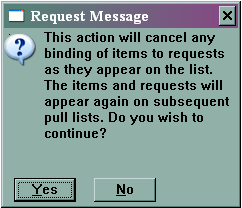

*Do NOT use the List Pulled option.

What if I forget and close the window before I check in the items? Run the pull list again right away and leave the window open until everything you pulled is checked in. You may want to print the list again because it may have changed a bit.

What if I forget and click List Pulled instead of Keep List? Don’t rerun the list. Just remember to do it correctly the next time. The result is your pull list will be locked for the remainder of the day. This prevents other locations from filling holds for those items you couldn’t locate. It could also lead to problems filling the hold with the correct copy.

Reminder: If you cannot locate an item on the shelf, put it in Trace status to prevent it from continuing to show up on your pull list. Trace items will not be flagged to fill holds.

Notes: This is the most efficient way to run the pull list in regards to staff time, selecting the best copy to fill a hold and filling a hold faster.

When you leave the Pull List window open until the items are checked in, the list is locked so no other branch is pulling an item to fill that same hold. That’s a good thing and could save us from duplicating work – two branches pulling the same item to fill one hold.

When you click Keep List *after* checking in the items you found, it releases the items you didn’t find/check in so they can appear on another branch’s pull list later that day. Again, that’s good because the hold might get filled quicker.

rev. 1/2018