Showing posts with label ValleyCat. Show all posts

Thursday, January 12, 2017

Forgot PIN Feature in ValleyCat

ValleyCat now has a 'Forgot PIN' option that allows the user to reset their 4-digit PIN themselves - IF they have an email address in their Horizon account. Here's how it works.

If they don't have an email address is their Horizon account, they get this message:

If they do have an email address in their Horizon account, they'll get this message. Obviously, if the email address on their account is someone else's, out of date or has a typo, they won't receive the Reset PIN email as expected despite this onscreen message.


Note: they don't need to also have 'email notices' selected in order to get the email; just an email address. 

Click on the link in the email.
The user is automatically logged into their account once they click Reset PIN.


If they try to enter a PIN with more than 4 digits or any other type of character:


This feature is NOT available in the Enterprise catalog.


rev. 5/2018


Friday, November 18, 2016

Unusual Emails of ValleyCat Records

Recently, a peson from another state called to report they were receiving emails like this for titles/items in ValleyCat. They have never been a borrower. What's going on? Are they being spammed? 


No, someone is not using ValleyCat to spam people. Unless we get more reports, this is most likely one person trying to harass another person by emailing them ValleyCat records.  It only happens once every few years. Actually ValleyCat isn't a very effective way to spam someone, since you can only email from the search results screen, the only thing you can change is the subject line and you can only send one record/email at a time.

Tell the person receiving the annoying emails to add the 'From' email address pictured above to their spam filter to prevent any more of these emails from reaching them. 


rev. 4/2018

Wednesday, October 20, 2010

My List Problems and High Number of Titles

Beginning in June 2010, we began receiving reports from customers regarding problems using the My List feature in ValleyCat. Their My List account indicates they had an excessively high number of titles (usually 200+), but no titles are actually displayed. We've seen as high as 415 titles as shown below. If this happens, the customer is unable to see any of the titles previously in My List or add any new ones.


You may also see this error regarding a problem with XSLT: 


We do not know what causes this to happen. The phenomenon has been reported to System and they are working with SirsiDynix to determine the cause/solution. Until the problem is resolved, here are a few things to keep in mind and tell the customer.

  • Report the problem to Tech Support including the customer's name and library card number.
  • In order to correct the problem, the customer's corrupted My List must be deleted. All titles that were on the list will be lost. There is no way to recover the titles.
  • When multiple family members use the same computer to check My List, and one person has problems, the problem will spread to all the My List accounts of the people using that computer. Therefore, if one family member has My List problems, others should refrain from accessing their own My List accounts from that computer until the problem is fixed by the Library.
  • This problem seems to afflict users who keep a very large number of titles in My List (i.e. 100+). It is advisable to use the Other Lists feature in My List to create smaller sub-lists.
Click the "My List" label below to see other postings with tips and tricks for using My List.

Monday, November 30, 2009

My List Titles Not Saving

Recently a patron reported that titles added to their My List were not being saved to their account. Here's a few tips for making sure this doesn't happen.

1. Be sure to log into your library account before adding items to My List. Otherwise, the titles will only be added to My List for that one session.

2. Just as important, remember to log out of your library account after adding titles to My List. It seems that if you forget to log out and the session times out on its own, the recently added titles will not be saved to My List.

Note: once titles have been 'lost' or 'removed' from My List, there's no way to get them back. They are gone forever. If your customer is concerned with losing their list of titles, suggest they email the list to themselves occasionally. See the other My List postings for more information on My List features.

Monday, August 31, 2009

"Small Fee for Holds" Message in ValleyCat

Whenever a customer places a request in ValleyCat, they receive the Request Confirmation page shown below. It will always contain the message "Please note, some libraries charge a small fee for holds" regardless of their btype or location. Thanks to Measure B, Fresno does not charge a fee to place a hold so it does not apply to our customers. However, some other SJVLS jurisdictions may charge their customers for this service. Hence the message. Since we all use a single Horizon/ValleyCat system, this message cannot be customized to fit each customer/location.


rev. 8/2018

Thursday, June 18, 2009

Wrong Cover Shown With Title in ValleyCat

In ValleyCat or the Enterprise catalog, you may occasionally come across a title with the wrong cover art. For example, the following screen shot shows a picture of "Vietnamese Cooking" next to the title for "The Fertility Plan". This anomaly is usually a result of conflicting ISBNs in the Marc record. Report these instances to the Cataloging Department using the Cataloging Correction Form found on Oz.


rev. 8/2017

Wednesday, June 17, 2009

No Requests on Empty Bib Records

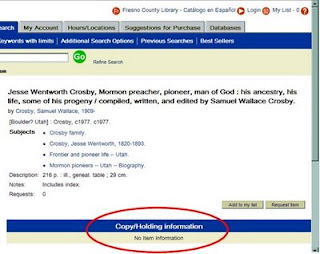
In most cases, every bib/title record in Horizon has one or more copies attached to it. However, there might be a few titles that don't have any copies attached. You cannot place a request on a title that has no copies attached to it. Here's what an "empty bib" looks like in ValleyCat:

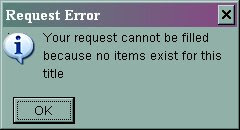
If you try to place a request on this empty bib, a rather cryptic message appears which says "visit the full bib page" as shown below:

If you try to do it in Horizon, you'll see the following message:


Empty bib records might occur for one of two reasons:
1. The bib record is very new and the copies have not been attached to it yet. Advise the customer to place the title on their "My List" and check back in a week or two. If it continues to be a problem, follow the instructions below for using the Catalog Correction Form.
2. The bib record is very old and all of the copies have been withdrawn. In you suspect this is the case, report the bib# and title to the Cataloging Department using the Catalog Correction Form found on Oz.  Note: System staff routinely runs a program that removes empty bib records from the catalog.


rev. 8/2017

Monday, May 4, 2009

"My List" Feature in ValleyCat

The My List feature in ValleyCat is designed so the user can create a temporary list of titles from their search results. Users can view the list, sort it, add or remove items from the list or email the list. They can also create up to 15 sublists. However, if they want to save them for future reference, they must first login into their account. Otherwise, the titles will only be saved to My List for that particular ValleyCat session.
  • In ValleyCat, click Login in the top right hand corner of the screen.
  • Enter your library card barcode & PIN#. Click the Login button.
  • Search the catalog.
  • Click the Add to My List button next to an item you want saved. The number total items saved in the list appears in the top right hand corner of the screen next to My List.
  • To review the list, click My List.
Other features include:
  • It appears that items will remain in My List indefinitely, *as long as a user is adding items to their list*. Otherwise, items will disappear from My List after 120 days. So the key to maintaining the list long term is to actively use it. It's not a bad idea for users to email themselves the list(s) every once in a while if they want a permanent record.
  • The main "My List" list can contain up to 100 titles. When the user reaches that limit the following message will display: "Your Book Bag is now full. You can add additional items only after you have removed one or more items from the bookbag from the MyList display."
  • Users can create up to 15 sublists within My List. Each sublist can contain up to 100 titles. So technically, a user could have up to 1,600 titles saved (100 in My List and 100 each in 15 sublists.) The user might want to create sublists to categorize their titles (i.e. cookbooks, mysteries, travel, etc.) Here’s how:
    • While logged into My List, place a check mark next to the titles you wanted moved to a new list.
    • Click the Move To drop down list. Select [New List] or an already created sublist.
    • Once My List itself has 100 items, the only way to add additional titles is to move items from My List to the selected sublist (new or existing).
  • Use Other Lists to move from one list to another.
  • Use Manage Lists to rename or delete lists.
  • Use Remove to delete items from My List.
  • Request items directly from My List.
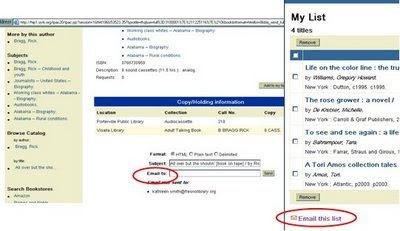
  • Email the list. Formats include HTML, plain text, delimited (to upload into a spreadsheet or database) as well as in MLA or Chicago citation styles (which would be helpful for students.) Note: only the list being viewed will be emailed. If the user has multiple lists, they would need to email each list separately. You do not need to check mark the items first. All the items on the list are emailed automatically.
Remember, if you don't log into your account, any items sent to My List will only be saved for that session and you will not be able to see items previously saved to My List.

rev. 2/2018

Friday, May 1, 2009

Limit ValleyCat Search to Specific Branch/Format/Language/Audience

ValleyCat - AFTER search is run - Limit By Option
After you run a search in ValleyCat and have a title list, click the Limit By box, scroll down and select the branch, format, language or audience from the list. Click Go. To select more than one limit, hold down the CTRL key as you click the limit. See the June 22, 2009, post for additional information on using the Limit By option.

ValleyCat - BEFORE search is run
From the "Keywords with Limits" search tab, enter the keyword search term(s), then scroll down to the "Refine your search" section. You can select one or more limits of the following limits: Branch, Format, Language and Other (child/teen materials, newer than 5 years). To select more than one item from a single list, hold down the CTRL key when you click your options.

rev. 1/2018

Tuesday, April 28, 2009

Select Pickup Location Outside FCPL

Some patrons want to place a hold at an FCPL location, but pick it up at a location outside of Fresno County. All ValleyCat access via the Fresno homepage and Fresno Horizon logins will only display FCPL locations. Therefore, you'll need to do one of the following in order to select a non-FCPL location:

  • In ValleyCat: Go to http://www.sjvls.org and from the drop-down on the right side select the ValleyCat catalog for the jurisdiction where the patron wants to pick up the hold. Find the item, place the request and select the pickup location for that jurisdiction. Both patrons and staff can use this method.
  • In Horizon: Go to File - Change Location. Select the location where the patron wants to pick up the hold. Search for the item, place the request and select from the list of pickup locations available for that jurisdiction. When you are finished, don’t forget to change location back to your own branch. This method is only available to staff.
Note: Just in case you're wondering, you cannot simply change the pickup location of an existing request to a non FCPL location via the borrower's record. Why? Because this method circumvents the holds rules in place for each jurisdiction and more importantly, the item will never appear on the pull list of the owning library. So it will look like you’ve placed the hold, but the item will never show up. So use one of the methods listed above instead.

rev. 8/2017

Wednesday, April 15, 2009

Email from Enterprise Catalog/ValleyCat and SPAM Blockers

In both the Enterprise catalog and ValleyCat, patrons can email themselves title records as well as items in "My List" via ValleyCat. These emails come from no-reply@sjvls.org. If a patron complains they did not receive the titles or lists they emailed to themselves, their email service may have placed them in their junk/bulk mail folder instead of their in box. Ask the patron to adjust their spam or junk mail settings so that email from no-reply@sjvls.org is allowed to come into their inbox.


rev. 7/2017