If a patron has moved to Fresno County permanently, but was previously registered at another SJVLS library (Coalinga-Huron, Kern County, Kings County, Madera County, Mariposa County, Merced, Porterville, Tulare County, or Tulare Public), update their borrower record as follows:
i. Update their address, email and/or phone as appropriate
ii. Change the Location field to your branch code
iii. Change the BType to the appropriate FCPL code i.e. FAD, FCH, FYA, etc.
iv. Change the Bstat to the appropriate FCPL code i.e. f93705, f93721
v. Change the Internet access to either Fresno Filtered or Fresno Unfiltered
It is not necessary to issue them a new library card.
rev. 4/2018

On The Horizon is an FAQ publication for the staff of the Fresno County Public Library on the use of Horizon and ValleyCat.
Showing posts with label borrowers. Show all posts
Showing posts with label borrowers. Show all posts
Friday, November 18, 2016
Wednesday, December 30, 2015
Look Up Where a Payment/Waiver Was Made
Every time you take a payment or waive charges on a borrower's account, it records where that transaction occurred - including any online payments made through SmartPay. Here's how to get that information.


- Open the borrower's account
- Close the Blocks screen if it appears
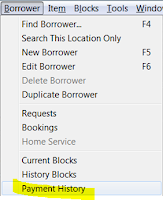
- On the menu -- Borrower -- Payment History
- Enter a date in the past


- Dept. = the name of the PC where the transaction occurred which could indicate the branch name. sjvls_ec indicates it was paid online via SmartPay. Sometimes, that name was never updated from the default on the image. So...
- Location = Click the Display button at the bottom of the window and highlight Location which will always be the branch code (sjvls for online payments).
- Payment = type of transaction (payment, waiver)
- Fee = type of fee (fine, Lost, LostPro, etc.)


Monday, August 31, 2009
No Remote Database Use for Fresno Non-Resident Borrowers
The library subscribes to a long list of online databases that can be accessed from any PC - either inside the library or remotely (outside the library - i.e. office, home, etc.) Our subscription agreements for these databases stipulate that only residents of Fresno County are allowed to access them from outside the library. We do this by requiring remote database users to verify their library card number through RPA before they get access.
This means that FCPL borrowers with the following non-resident borrower types do not have remote access to any of our databases. (Although they can still access our databases from inside the library.)
rev. 8/2018
This means that FCPL borrowers with the following non-resident borrower types do not have remote access to any of our databases. (Although they can still access our databases from inside the library.)
- fnc - Fresno (out-of-state) NonResident
- fnr - Fresno (in-system) NonResident
- fnrch - Fresno (in-system) NonResident Child
- fnrya - Fresno (in-system) NonResident Young Adult
- fns - Fresno (out-of-system) NonResident
- fstnr - Fresno STAFF Non-Resident
rev. 8/2018
Monday, June 8, 2009
Library Cards That Expire Based On Borrower’s Age
As of September 1, 2006, Fresno County library cards with the following borrower types were set to expire automatically based on the age of the borrower as noted below. This date overrides the standard five-year expiration date for these borrower types. This should reduce the number of patrons with a borrower type that does not correspond to their age (i.e. a 15-year-old with an FCH card or a 30-year-old with an FYA card.) These are the borrower types that use the borrower's age to set the expiration date of the card:
Age -- Borrower type
12 -- FCH - Fresno Child
12 -- FCHF - Fresno Child Foster Care
12 -- FNRCH - Fresno Non-Resident Child
18 -- FYA - Fresno Young Adult
18 -- FYAF - Fresno YA Foster Care
18 -- FNRYA - Fresno Non-Resident YA
Note:
> Horizon will NOT automatically change the card to the appropriate new borrower type. It will only prompt you to renew the card. Staff must manually change the borrower type.
> The automatic expiration by age will only affect borrowers issued cards after September 1, 2006. It will not automatically update the expiration dates of borrowers issued cards before that date.
rev. 2/2018
Age -- Borrower type
12 -- FCH - Fresno Child
12 -- FCHF - Fresno Child Foster Care
12 -- FNRCH - Fresno Non-Resident Child
18 -- FYA - Fresno Young Adult
18 -- FYAF - Fresno YA Foster Care
18 -- FNRYA - Fresno Non-Resident YA
Note:
> Horizon will NOT automatically change the card to the appropriate new borrower type. It will only prompt you to renew the card. Staff must manually change the borrower type.
> The automatic expiration by age will only affect borrowers issued cards after September 1, 2006. It will not automatically update the expiration dates of borrowers issued cards before that date.
rev. 2/2018
Monday, June 1, 2009
Approved Setting in Borrower Record
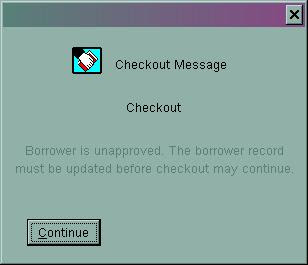
There is a field called "Approved" in the borrower record. It's just below Borrower Note in the order of the registration screen. Most of the time, this option is check marked. However, if the check mark is removed for whatever reason, the patron will not be able to use their library card to check out materials either at self check or by staff in Horizon (see screen shot below.) They will also not be able to access public computers.To make their account active again, place a check mark next to the "Approved" field and click Save.
Note: They can still use their card to place holds.
rev. 2/2018
Note: They can still use their card to place holds.

rev. 2/2018
Friday, May 1, 2009
Last_Comp_Use in Borrower's Record
The borrower's record includes a field that shows the last time they used their library card to access an some type of electronic resource. This could include paying a fine online, checking out an ebook, using a library database, signing into their account on ValleyCat or using a public PC.
The field is labeled last_comp_use and is located on the first line of the borrower record (far right). This information is especially helpful when we purge inactive borrowers from the database. A patron may not have checked out any materials for three years, but if they used their card to access one of the library's databases or public computers, they are still considered an active account and won't be deleted.
rev. 1/2018
The field is labeled last_comp_use and is located on the first line of the borrower record (far right). This information is especially helpful when we purge inactive borrowers from the database. A patron may not have checked out any materials for three years, but if they used their card to access one of the library's databases or public computers, they are still considered an active account and won't be deleted.
rev. 1/2018
Tuesday, April 28, 2009
Search This Location Only Option for Borrowers
Here's the scenario: you search for a borrower, but their record doesn't appear. Yet when you try the same exact search on another PC their name comes up right away. What’s going on?
In the Horizon menu under Borrower, there is an option for “Search This Location Only”. Select this option only if you want to search through the list of borrower’s with Location = your branch code in their registration record.
It is easy to accidentally select this option when you really intended to select “Find Borrower” instead. The option will remain selected even when you change users. If you are having trouble finding a borrower, make sure the “Search This Location Only” option does not have a check mark next to it. If it does, just click the option to eliminate the check mark, then try your search again.

rev. 1/2018
In the Horizon menu under Borrower, there is an option for “Search This Location Only”. Select this option only if you want to search through the list of borrower’s with Location = your branch code in their registration record.
It is easy to accidentally select this option when you really intended to select “Find Borrower” instead. The option will remain selected even when you change users. If you are having trouble finding a borrower, make sure the “Search This Location Only” option does not have a check mark next to it. If it does, just click the option to eliminate the check mark, then try your search again.
rev. 1/2018
Wednesday, April 15, 2009
Borrowers with Multiple Last Names
Some borrowers may have more than one name that could be considered their last name or they have multiple words that make up their last name (i.e. Jose Cruz Hernandez). Sometimes it is difficult to decide how to enter these types of names into the borrower’s record. The rule of thumb is to enter the borrower’s name into Horizon exactly as it appears on their driver’s license or ID. For example:
rev. 1/2018
- License says: Jose Cruz Hernandez. Enter into Horizon as: Hernandez, Jose Cruz
- License says: Emilia Rodriguez Hernandez De La Cruz. Enter into Horizon as: De La Cruz, Emilia Rodriguez Hernandez
- License says: Josephina Ernestina Santos-DeLeon. Enter into Horizon as: Santos-DeLeon, Josephina Ernestina
- License says: William Vander Plaats. Enter into Horizon as: Vander Plaats, William
rev. 1/2018
Subscribe to:
Posts (Atom)