Showing posts with label online payments. Show all posts

Wednesday, December 30, 2015

Look Up Where a Payment/Waiver Was Made

Every time you take a payment or waive charges on a borrower's account, it records where that transaction occurred - including any online payments made through SmartPay. Here's how to get that information.
  1. Open the borrower's account
  2. Close the Blocks screen if it appears
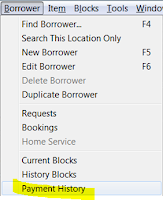
  3. On the menu -- Borrower -- Payment History
  4. Enter a date in the past


  • Dept. = the name of the PC where the transaction occurred which could indicate the branch name. sjvls_ec indicates it was paid online via SmartPay. Sometimes, that name was never updated from the default on the image. So...
  • Location = Click the Display button at the bottom of the window and highlight Location which will always be the branch code (sjvls for online payments). 
  • Payment = type of transaction (payment, waiver)
  • Fee = type of fee (fine, Lost, LostPro, etc.)

Monday, September 17, 2012

Delay of SmartPay Payments - Very Rare

Your customer calls and says, "I paid my fines online last night, but it still hasn't hit my bank account/credit card yet." Here's what's happened.

On very rare occasions (i.e. twice in 12+ months), fines on their Horizon account are cleared when they make a payment through SmartPay. However, the transaction doesn’t make it to SmartPay's server for final processing. That transaction is flagged the next morning and System staff manually add it to the next night’s batch. So in that case, the customer would notice a 24-hour delay in the transaction posting to their credit card/bank account.

Double Payments in SmartPay Not Possible

Your customer calls and says "I paid my fines online and it charged my card twice." Actually the system is built to prevent double payments. Here's what happens.

If they used a bank debit card, the bank can place a hold on the funds in their bank account. This ensures the money will be there when the transaction is finally processed. Usually there's just a single hold on the funds. But if somehow the customer clicks the Submit button twice very quickly, there may be two holds for the same amount on the funds in their account. Eventually both of these holds will be removed when the funds are actually taken from the customers bank account. There is no way for the Library to release that extra hold on the funds. The bank places that hold and only they can clear it.

If the customer waits a few more days the second pre-authorization should go away.  If they dispute the second charge the bank is likely to confuse it with the real charge and take the real payment away from us and charge us $20, which will get charged back to the library. So see if the customer can wait a few more days.

But what if they hit the back button during the transaction? The transaction that actually charges the credit/debit card only takes place after the Horizon fines are cleared. Even if a patron hits the back button after paying, it will not post a second charge to the credit/debit card because the specific fines have already been cleared.