Showing posts with label email. Show all posts

Monday, November 21, 2016

Where does the email address go in a customer record?

In regards to the new Perm/Mailing/Temp address types, if the borrower has more than one address, it does make a difference which type their email address is attached to.

If a customer has:
  • Perm Only – Use Perm to set email address & related fields
  • Mailing & Perm – Use Mailing to set email address & related fields
  • Temp & Mailing/Perm – Use Temp to set email address & related fields. When those dates expire, it will revert to whatever method is set in the Mailing/Perm.
Note: This affects hold and overdue notices. Preoverdue notices don’t care where the email address is listed on the record; they are controlled by a separate program. Lost notices are always printed and mailed to the borrower. If

In case, the email is not put on the proper address type, don’t worry. The notification will still be sent by print or phone (based on other settings in the record). 


rev. 4/2018

Friday, November 18, 2016

Unusual Emails of ValleyCat Records

Recently, a peson from another state called to report they were receiving emails like this for titles/items in ValleyCat. They have never been a borrower. What's going on? Are they being spammed? 


No, someone is not using ValleyCat to spam people. Unless we get more reports, this is most likely one person trying to harass another person by emailing them ValleyCat records.  It only happens once every few years. Actually ValleyCat isn't a very effective way to spam someone, since you can only email from the search results screen, the only thing you can change is the subject line and you can only send one record/email at a time.

Tell the person receiving the annoying emails to add the 'From' email address pictured above to their spam filter to prevent any more of these emails from reaching them. 


rev. 4/2018

Tuesday, May 6, 2014

Troubleshooting Problems w/ Email Notices for Gmail Accounts

If a customer with a gmail account is set up for email notices, but is not receiving them even though their email address is correct, here's some troubleshooting steps you can take:
  1. Have the customer create a filter in their Gmail account. Go to Settings > Filters > create a new filter with Subject “Library Notice” with the following options check marked. 
  2. Working with your customer, place a test/fake hold on their account
  3. Check it into the hold shelf.
  4. Did they receive an email notice for the test hold the following day after 11 a.m.?
  5. If they still don't receive the email, contact Tech Support for more troubleshooting tips. 


Monday, June 10, 2013

Hyperlinks on Email Notices

A customer recently asked, "Why isn't there a link to the overdue title on my email notice?" Here's why. 
  1. Overdue notices are generated within the Horizon program itself and their configuration is not very flexible.
  2. There's a very limited amount of space to add the lengthy link to ValleyCat. 
  3. They could look at the list of titles they have out, but could not renew any that are overdue. 
You might ask, "Why then do Preoverdue Notices contain a link to the general "My Account" page?" Here's why: 
  1. They are generated by a third party program that's a bit more flexible than Horizon.
  2. The link to "My Account" is much shorter. 
  3. Since the item is not yet overdue, the customer can still renew their item(s).

It would be great if we could configure email notices to be more user friendly, but that's not possible with our current system. But at least now you know the reasons.  

Tuesday, March 2, 2010

Email Notices and SPAM Blockers

If the customer's email account has the spam blocker turned on, it may block email notices coming from the library. Their email service may be rerouting the notices to their "junk/bulk" mail folder or blocking them altogether. Either way, the customer should adjust thier spam or junk mail settings so that email from the following email addresses is allowed through to their inbox:

In some cases, they may need to turn down/off their spam blocker to allow one of our notices to come through. Then they turn it up/on again once the frbounce and/or noreplysjvls address is allowed through as a valid sender. As staff, you can work with the customer to place some sort of test hold to generate an email notice, have them adjust their spam blocker and the next day (after 11 a.m.) see if the email notice gets through. In most cases, this type of adjustment will fix the problem.

Wednesday, April 15, 2009

Email from Enterprise Catalog/ValleyCat and SPAM Blockers

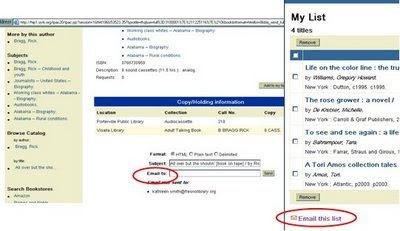
In both the Enterprise catalog and ValleyCat, patrons can email themselves title records as well as items in "My List" via ValleyCat. These emails come from no-reply@sjvls.org. If a patron complains they did not receive the titles or lists they emailed to themselves, their email service may have placed them in their junk/bulk mail folder instead of their in box. Ask the patron to adjust their spam or junk mail settings so that email from no-reply@sjvls.org is allowed to come into their inbox.


rev. 7/2017

Email Notices

Borrowers have the option to receive all of their notices by email – that includes holds, overdue and billing notices, as well as an option for preoverdue reminder notices. (See other posts related to preoverdue notices. ) They can sign up for the service in person at any branch or via http://www.fresnolibrary.org/email.html. Requests made via the webpage will be handled by Support Services.

How do I activate email notices on a patron’s account?
  • In the borrower's account, for Notice by: Select Email
  • E-Mail Name: enter borrower’s name as it appears in the name field above. This information will appear in the To: field of the email. 
  • E-Mail Address: Enter patron’s email address. It is important to be very accurate. One typo will cause the notice to fail. Case does not matter, although most people enter it in all lower case letters for easier readability.
  • Preoverdue: Check this box if patron wants to receive a reminder notice 3 days before an item is due. They can opt out of this option if they choose and still receive all the other notices by email.
  • Phone: Make sure all phone numbers are set to 'No Telephone Notices'
  • Save
How do I stop or deactivate email notices on a patron’s account?
  • Notice by: Select Stnd
  • E-Mail Name: delete name
  • E-Mail Address: delete email address
  • Preoverdue: uncheck box
  • Phone: If the patron wants to receive their notices by phone, set one of their phone numbers to 'Home' or one of the 'With Telephone Notices' options. If they want to receive notices by U.S. Mail, leave the phone set to 'No Telephone Notices' option.
  • Save
What if a borrower’s email changes? Staff can change their email in Horizon, but borrowers can also update their own e-mail address directly from the "My Account / Profile" page in ValleyCat as follows:
  • Go to fresnolibrary.org – Catalog – My Account
  • Enter their library barcode and PIN
  • Click the Review Address/PIN tab
  • Email Information – type in new email address
  • Click Update. It is immediately updated in Horizon.
What if the email address is incorrect? Notices sent to a bad email address are returned to a Support Services mailbox. The undeliverable email notice will be printed and sent via U.S. mail to the borrower. Their account will be reset to standard mail delivery so they will receive future notices by U.S. mail. A Message to Borrower block will be placed on their account to “Update Email Address and Reactivate Email Notices”.

Horizon still shows “Hold Notification – Mail” block for email notices. The hold notification block on the borrower’s account in Horizon will show “Hold Notification – Mail” even if they receive email notices. The Horizon block message does not differentiate between U.S. Mail and Email. The only way to tell if they have email notices activated is to look at their registration record.

Can borrowers receive notices by more than one method (i.e. email and phone)? No – they have to select one method of delivery – phone, email OR standard mail.

Can borrowers receive email notices in Spanish? No, they are only available in English.

rev. 1/2018

Tuesday, April 14, 2009

Preoverdue Notices Option

Since 2005, our patrons have had the option to receive library notices (holds, overdue, lost) by email. (See On The Horizon 2.5) We’ve recently added several new email notice options as described below.

Horizon Option for Preoverdue NoticesEvery patron who signs up for email notices, also has the option to receive “preoverdue” notices. A preoverdue notice is generated 3 days before an item is due to remind the patron to renew/return it. The email includes the following message/link along with the title(s) affected:

“Courtesy reminder - The following items are due soon. To renew items go to http://hip1.sjvls.org/ipac20/ipac.jsp?profile=fhq&menu=account or contact the library. Please do not reply to this email. The mailbox is unattended.”

In order to receive these reminder notices:
  1. The patron must sign up to receive Horizon email notices and
  2. The Preoverdue option must be checked.

Can a patron receive Horizon preoverdue notices if they get notices by regular mail or phone? No, they must be signed up for email notices. Patrons can sign up in person or online at http://www.fresnolibrary.org/email.html.
Do they have to receive preoverdue notices in order to receive other notices by email? No, they can opt out of the reminder notices, but still receive all other email notices. Note: existing patrons signed up for email notices who used their card in 2008, have been automatically signed up to receive preoverdue notices.

rev. 1/2018