Monday, July 20, 2009

Status Update Schedule For Trace, Lost, and Missing Items

The following chart shows the progression of items from one status to another relative to items that have disappeared from the collection. Horizon will automatically change the status from Lost to Missing on a daily basis.

Trace to Missing, Relocation in Progress to Missing and Missing to Withdrawn status is done manually by Support Services on a monthly basis. For example, if you can't find an item on the shelf, put into Trace status. If it is not found in 3 months, the status will change to Missing. If it is not found in another 6 months, the status will be changed to Withdrawn and the item will be deleted from Horizon within a month.

(Click on the image to enlarge it.)


rev. 2/2018

Thursday, July 9, 2009

Expired Library Cards

Most types of Fresno County library cards are set to expire automatically every five years (1,825 days). A complete list of borrower types and expiration periods can be found in Chapter 400 of the Library Manual on OZ.
Card Expired Before Today’s CKO
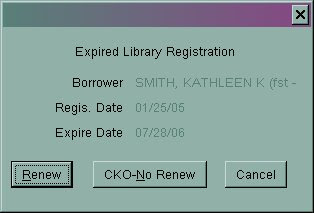
  • If a patron’s account expired before today’s check outs, the Expired Library Registration window will appear as soon as their card is scanned.

  • Click Renew and the Renew Registration window opens.
  • Verify the borrower type and phone number are correct. A new expiration date will be assigned automatically.
  • Click Save – Close.
Card Expires During Today’s CKO Period
If the patron’s card is set to expire during the upcoming checkout period, Horizon will automatically assign the usual check out period to that item(s). The card will expire while those items are checked out and staff can renew it the next time the patron uses their card.


rev. 2/2018

Thursday, June 18, 2009

Wrong Cover Shown With Title in ValleyCat

In ValleyCat or the Enterprise catalog, you may occasionally come across a title with the wrong cover art. For example, the following screen shot shows a picture of "Vietnamese Cooking" next to the title for "The Fertility Plan". This anomaly is usually a result of conflicting ISBNs in the Marc record. Report these instances to the Cataloging Department using the Cataloging Correction Form found on Oz.


rev. 8/2017

Wednesday, June 17, 2009

No Requests on Empty Bib Records

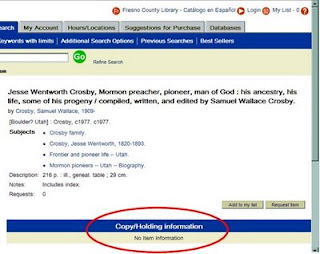
In most cases, every bib/title record in Horizon has one or more copies attached to it. However, there might be a few titles that don't have any copies attached. You cannot place a request on a title that has no copies attached to it. Here's what an "empty bib" looks like in ValleyCat:

If you try to place a request on this empty bib, a rather cryptic message appears which says "visit the full bib page" as shown below:

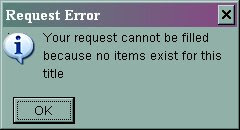
If you try to do it in Horizon, you'll see the following message:


Empty bib records might occur for one of two reasons:
1. The bib record is very new and the copies have not been attached to it yet. Advise the customer to place the title on their "My List" and check back in a week or two. If it continues to be a problem, follow the instructions below for using the Catalog Correction Form.
2. The bib record is very old and all of the copies have been withdrawn. In you suspect this is the case, report the bib# and title to the Cataloging Department using the Catalog Correction Form found on Oz.  Note: System staff routinely runs a program that removes empty bib records from the catalog.


rev. 8/2017