rev. 8/2017
Thursday, June 18, 2009
Wrong Cover Shown With Title in ValleyCat
In ValleyCat or the Enterprise catalog, you may occasionally come across a title with the wrong cover art. For example, the following screen shot shows a picture of "Vietnamese Cooking" next to the title for "The Fertility Plan". This anomaly is usually a result of conflicting ISBNs in the Marc record. Report these instances to the Cataloging Department using the Cataloging Correction Form found on Oz.

rev. 8/2017
rev. 8/2017
Wednesday, June 17, 2009
No Requests on Empty Bib Records
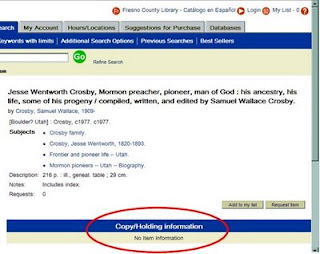
In most cases, every bib/title record in Horizon has one or more copies attached to it. However, there might be a few titles that don't have any copies attached. You cannot place a request on a title that has no copies attached to it. Here's what an "empty bib" looks like in ValleyCat:
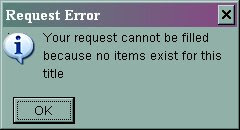
If you try to place a request on this empty bib, a rather cryptic message appears which says "visit the full bib page" as shown below:

Empty bib records might occur for one of two reasons:
If you try to place a request on this empty bib, a rather cryptic message appears which says "visit the full bib page" as shown below: 
Empty bib records might occur for one of two reasons:
1. The bib record is very new and the copies have not been attached to it yet. Advise the customer to place the title on their "My List" and check back in a week or two. If it continues to be a problem, follow the instructions below for using the Catalog Correction Form.
2. The bib record is very old and all of the copies have been withdrawn. In you suspect this is the case, report the bib# and title to the Cataloging Department using the Catalog Correction Form found on Oz. Note: System staff routinely runs a program that removes empty bib records from the catalog.
rev. 8/2017
rev. 8/2017
Monday, June 15, 2009
Hold Notification Block Won't Go Away
There are times when Horizon does not automatically remove the Hold Notification Block even after the borrower checks out the item or the hold expires and the item is returned to the owning branch. You can try to delete the block manually. However, if that still does not clear the block, report the borrower’s name and barcode, and the item’s title and barcode to the Jurisdiction System Administrator so it can be removed by a system-level process.
rev. 2/2018
rev. 2/2018
Monday, June 8, 2009
Caution: Do Not Issue Any Library Cards With Barcode 0000000000
In the past, Fresno may have issued library cards with the barcode 0000000000 – for example the new mother library card program, where babies were given 0 accounts. However, in Horizon, a library card barcode with all zeros causes major problems.
For example, the zero account will “magically” appear in the middle of working with another borrower. This results in that borrower’s items being checked out to the zero account instead of their own. The resulting research and rework to correct the problem is very time consuming.
So, please remember…DO NOT EVER create a library card with the barcode 0000000000.
For example, the zero account will “magically” appear in the middle of working with another borrower. This results in that borrower’s items being checked out to the zero account instead of their own. The resulting research and rework to correct the problem is very time consuming.
So, please remember…DO NOT EVER create a library card with the barcode 0000000000.
Subscribe to:
Posts (Atom)