

On The Horizon is an FAQ publication for the staff of the Fresno County Public Library on the use of Horizon and ValleyCat.
Friday, March 4, 2016
Data Entry Standard for Borrower's with No Phone#
If the borrower does not have a phone number, enter 000-000-0000 in the phone field of the borrower's record. Set the phone type to h-no (Home-No Telephone Notices). This is part of the Borrower Registration Data Entry Standards set by the San Joaquin Valley Library System.


Thursday, February 4, 2016
Phone Notice Customer Is Mailed a Notice
Scenario: your customer's account is set to receive their notices by phone. So why did receive a notice in the mail?
Reason 1: The automated telephone messaging service (TM3) calls the customer to deliver the hold or overdue notice. If it is unsuccessful after 3 tries (no answer, line disconnected, fax machine, not ringing, etc.), that notice will be printed and mailed via USPS the next business day. Look at the notification block on the customer's account to see whether it was complete or incomplete.
What can you do? Verify the customer's phone number. Do they have an answering machine? There are a few types of answering machines that do not work with TM3. TM3 only recognizes these area codes. Do they have an alternate number? Would they like to try email notification instead?
Complete - the notice was delivered by phone

Phone Notice Incomplete - TM3 could not deliver the notice so it will be mailed the next business day.

Reason 2: Final overdue notices (we've told you before, but you'll be charged if you don't return the item) and lost notices (the item is now lost and you owe this much) are always printed and mailed - regardless of what notice type the customer has selected. Click here to see how much time elapses between the first overdue and lost notice.
Reason 1: The automated telephone messaging service (TM3) calls the customer to deliver the hold or overdue notice. If it is unsuccessful after 3 tries (no answer, line disconnected, fax machine, not ringing, etc.), that notice will be printed and mailed via USPS the next business day. Look at the notification block on the customer's account to see whether it was complete or incomplete.
What can you do? Verify the customer's phone number. Do they have an answering machine? There are a few types of answering machines that do not work with TM3. TM3 only recognizes these area codes. Do they have an alternate number? Would they like to try email notification instead?
Complete - the notice was delivered by phone


Thursday, January 28, 2016
Dos and Don’ts of Changing the Hold Pickup Location
You can change the pickup location of a customer's hold, but only in certain circumstances...otherwise the hold will never be filled.
Scenario: your customer has moved and wants to pick up all their outstanding requests at the branch closest to their new
home. It is okay to change the hold pickup location for a customer’s hold as
follows:
- The old and new pickup location must be within the same library jurisdiction. So you can change it from Clovis to Fig Garden. But never Beale Library (Kern County) to Fig Garden (Fresno County).*
- You can change the pickup location anytime before an item is attached to the request or if the status of the request / item = transit hold / transit request. If it's already on the hold shelf or expired, no dice.
Why? Because this method circumvents the holds rules in
place for each jurisdiction so there's a good chance the hold will never be filled because the item will never appear on the pull list of an owning library.
Yes, Horizon will let you change
the pickup location from Beale Library (Kern County) to Fig Garden (Fresno
County), but the request will never be filled. Even your customer is #1 in the
queue, all the other requests will just jump over it as they are filled first.
Some staff have tried to 'help' their customers who have been blocked from placing a hold on a title by making the request through say Kern County’s ValleyCat page (or in Horizon under a Kern County Location). After the request is made with a Kern County pickup location, they manually change it to one of Fresno's pick up locations. This 'work around' does not help the customer. In fact, it pretty much ensures they will never get the item - even if Fresno buys their own copies.
The customer should wait and place a hold on that title when there are requestable copies available. Chances are that will occur shortly if it's a new popular title. If not, staff or the customer can make a Request for Purchase or an ILL as appropriate.
rev. 5/2018
Some staff have tried to 'help' their customers who have been blocked from placing a hold on a title by making the request through say Kern County’s ValleyCat page (or in Horizon under a Kern County Location). After the request is made with a Kern County pickup location, they manually change it to one of Fresno's pick up locations. This 'work around' does not help the customer. In fact, it pretty much ensures they will never get the item - even if Fresno buys their own copies.
The customer should wait and place a hold on that title when there are requestable copies available. Chances are that will occur shortly if it's a new popular title. If not, staff or the customer can make a Request for Purchase or an ILL as appropriate.
rev. 5/2018
Wednesday, December 30, 2015
Look Up Where a Payment/Waiver Was Made
Every time you take a payment or waive charges on a borrower's account, it records where that transaction occurred - including any online payments made through SmartPay. Here's how to get that information.
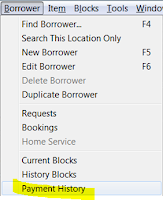


- Open the borrower's account
- Close the Blocks screen if it appears
- On the menu -- Borrower -- Payment History
- Enter a date in the past


- Dept. = the name of the PC where the transaction occurred which could indicate the branch name. sjvls_ec indicates it was paid online via SmartPay. Sometimes, that name was never updated from the default on the image. So...
- Location = Click the Display button at the bottom of the window and highlight Location which will always be the branch code (sjvls for online payments).
- Payment = type of transaction (payment, waiver)
- Fee = type of fee (fine, Lost, LostPro, etc.)

Subscribe to:
Posts (Atom)