If you only have a portion of the item barcode, you may still be able to find the item in Horzion. This might happen more often with a DVD or CD that has been separated from its case and only has the last 4 digits of the barcode written on the disk. The following steps assume this scenario. You can adapt them as needed for your situation.
- Open an item barcode search window in Horizon.
- The asterisk (*) serves as a wildcard symbol in the search. For example, if the last 4 digits are 7743, enter the search as *7743. This will return any items that end in 7743 regardless of whether they are 10 or 14 digit barcodes.
- If the search returns too many items, click the Limit button.
- Hightlight the field Medium (gmd).*
- With "contains" selected, enter text into the Limit Text field. Typically DVD or CD narrows it down to just that format. Since the title is usually included on the disk itself, you can pinpoint the record from there.
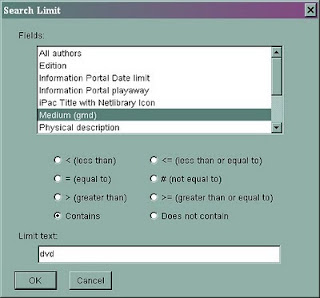
*gmd is a cataloging acronym for "general material designation" or a fancy way of saying "format".
When making a new library card registration, you may have encountered the message "Proxy Number Required" when you tried to save the record. This message appears if you accidentally click on a field in the Proxy Borr area of the registration form. There is a way to clear this message and save the record without having to start the registration from scratch. Go to the Proxy Borr section of the form. Click the Delete button. This should clear any phantom characters in that section and allow you to save the record. The same fix (click the Delete button) works if you encounter a similar problem in the Home Service area of the registration form.
Occasionally you will come across a title in the catalog that does not have any copies attached to it. We call that an empty bib record. System has several processes to "clean up" these empty bibs.
Once a month, System runs a routine that deletes all of the copies with a status = 'wd' or withdrawn. Any bib records that end up empty through this process are deleted in a separate process once or twice a month as staff time permits.
For bib records that end up empty from other processes, System tries to clean those up at least every six weeks, but sometimes it stretches out longer. These empty bibs are harder to do because System staff have to examine them one-by-one. In some cases, the empty bib is actually a current title undergoing cataloging and in the case of world language materials, it can take weeks to get items attached. In other cases, one of the System members may input on order record, but doesn't create any copies as they should. So it's not a simple matter of "just delete all the empty bibs".
If you encounter an empty bib record you think should be deleted, report it to Cataloging using the Catalog Correction Form found on OZ. Clean up is an ongoing process and just like doing the dishes, there's always a new batch to "wash" every day.
rev. 1/2020
Every once in a while you may come across a request list where the number to the left of the customer's name does not match their number in the queue. For example, in the screen shot below Customer #1 Hauser, Paul B is #46 in the queue. This is an occasional bug where the request order numbers do not get reset as they are filled. We don’t know why it happens. But it doesn’t affect the order in which the holds are filled. 

